
From Free Backlink Audit to Outreach Targets
By LincSpider Team · 2026-07-23 · 12 min

Search backlink audit and you’ll land on suite dashboards, toxic-score heatmaps, and “free audit tool” forms that email you a PDF. Some of that is genuinely useful. A lot of it stops the moment the report lands in your inbox. You still have a list of domains and no plan for what to do next Tuesday.
This guide is about the missing half: run a free or light backlink audit, classify what you find, and convert the useful rows into outreach targets. We’ll cite Ahrefs’ own backlink audit guide with respect — they wrote the deep version of this job. We’re not claiming LincSpider replaces audit suites. It’s the Chrome execution layer after you’ve decided which pages deserve a human comment or a short email.
For budget tool stacking, see Affordable Link Building Tools. For competitor-seeded lists, see Expand Backlinks from Competitor Link Pages.
What a Backlink Audit Is (and Isn’t)
A backlink audit is a structured look at who links to you (and sometimes who links to peers), so you can decide: keep, monitor, pursue, or — carefully — distance yourself from junk.
It is not:
- A ranking guarantee
- A license to mass-disavow everything with a low score
- An auto-post queue
- Proof that comment links alone will move positions (SEJ has been blunt about that for years)
On r/SEO:
No tool can build link for you. Even if it does, it would be a spam with no SEO value.
That’s the audit filter that matters. Reports don’t build relationships. People do.
r/DigitalMarketing puts the same idea differently:
The process matters more than the tool.
A free backlink audit tool is only as good as the process you attach to its export.
Free / Light Audit Stack You Can Run This Week
You do not need a full crawl database on day one. You need enough signal to prioritize.
1. Google Search Console (your site)
Open Links (UI labels shift; you’re looking for top linking sites / top linked pages). Export what you can. Tag rows: homepage vs deep page, obvious directory vs editorial-looking domain, spammy patterns you’ve seen before.
GSC is a sample of links Google chose to show you, not a universe. Treat it as a free starting inventory for a backlink audit free workflow — not as Ahrefs Lite.
2. Bing Webmaster Tools
Same community tip we lean on elsewhere:
Go to Bing Webmaster Tools… Add a competitor domain. You'll see referring domains
(thread)
Use it two ways: sanity-check your own referring set, and seed contrast lists from peers. Coverage won’t match a paid index. For a solo operator, “good enough seeds” beats a perfect database you never open.
3. Free checkers and toolbars (sampling only)
Free backlink checkers are fine for a second opinion on a domain you already care about. They’re weak as your only source of truth. Cross-check anything that looks toxic or oddly authoritative. If a free tool and GSC disagree wildly, open the page yourself.
Broken-link helpers (mentioned on r/SEO as “check my links”-style extensions) are a tactic, not an audit. Useful for one outreach motion; not a substitute for reviewing your profile.
4. Spreadsheet columns that keep you honest
| Column | Example | Why |
|---|---|---|
| source | GSC / Bing / free checker | Trace which free layer paid off |
| linking_url | https://…/blog/post | Source of truth |
| type | editorial / comment / directory / junk | Forces a decision |
| action | keep / monitor / outreach / skip | Audit → next step |
| notes | “author replies; niche fit” | Future-you forgets |
If a column stays empty for a month, delete it.
A one-week light-audit experiment
- Day 1: Export GSC linking sites. Cap the sheet at 100 rows if you’re drowning.
- Day 2: Spot-check twenty URLs in the browser. Drop obvious spam farms without guilt.
- Day 3: Pull one competitor’s referring pages from Bing WMT. Merge unique blogs into the sheet.
- Day 4: Tag
outreachfor open comment threads or contactable editors only. - Day 5–7: Execute five human touches (comment or email). Log results.
If that week felt productive, then consider paying for deeper crawl history. If it felt miserable because you couldn’t see competitor gaps at all, a suite may be the right spend. If writing was the bottleneck, no audit tool will save you.
What Ahrefs-Style Audits Add (Respectfully)
Ahrefs’ backlink audit guide walks through the job the way practitioners mean it: inventory, quality signals, risk review, and careful remediation. We’re not rewriting their playbook. We’re saying: when you need depth, use depth.
Paid suites earn their keep when you:
- Manage multiple sites or clients and need shared history
- Investigate a sudden ranking drop and need crawl breadth GSC doesn’t show
- Run weekly competitor gap work (Ahrefs on gap analysis, finding competitors’ backlinks)
- Already live inside the suite for keywords and content
On r/seogrowth:
As a first step I would run a competitor backlink gap analysis using semrush or ahrefs
Fair first step for finding. Still not a submit button.
Disavow caution, same spirit as Ahrefs and Google’s long-standing advice: don’t mass-disavow because a free tool painted red. Bad links you created on purpose are different from random junk the web threw at you. When unsure, monitor first.
If impressions or rankings fall off a cliff, align timelines before you upload a Disavow file: GSC drop date ↔ when the junk cluster first appeared ↔ share of spammy referring domains (in severe cases practitioners report half or more of the profile looking artificial — treat that as a case study, not a threshold). Use Google’s domain: style list format, expect delays after upload, and keep building clean links while you wait. Google’s own guidance still leans toward “most sites never need Disavow.” Prefer monitoring when you cannot prove a manual action or a clear self-inflicted spam pattern.
Red sources, link farms, and dilution before Disavow
When Semrush (or similar) marks a domain toxic, suspicious, or red, treat that as a submission filter — not just a cleanup line item. Don't actively pitch comment slots or directory listings on sources the tool already flags as dangerous. Adding more junk raises your spam ratio without moving rankings.
If junk already dominates your profile — practitioners often worry when more than half of referring domains look sketchy — run two tracks in parallel:
- Dilute: earn cleaner editorial and comment links you'd actually want on your resume
- Remove: email site owners asking them to drop your link; keep records
Disavow stays last. Google’s guidance still reads like “most sites never need this.” Use it when you can align a traffic cliff with a spam burst you didn't create — not because a free checker painted half your list red.
Tool nuance we've learned: Semrush’s “toxic” and “suspicious” labels run aggressive. Plenty of sites with real traffic get flagged. Use those scores as reference, not automatic reject lists — except link farm classifications, which we take more seriously. Farms often mean outbound links to anyone who asks; if you submitted to one early, expect slow email threads asking for removal.
Turn Findings into Outreach Targets
This is the conversion step most “backlink audit tool” pages skip.
Split your sheet into four buckets:
| Bucket | Meaning | Next action |
|---|---|---|
| Keep | Healthy editorial mentions | Track; maybe deepen relationship |
| Monitor | Weird but not urgent | Re-check next audit |
| Outreach | Niche blogs / resource pages you’d want to join | Comment or email |
| Skip | Spam farms, irrelevant directories | Ignore |
For the Outreach bucket, filter again for comment-ready or email-ready pages:
- Recent post or active thread
- Visible form or real contact path
- Niche overlap with what you build
- Not a wall of “Nice post!!!” spam
Competitor referring blogs that already host related discussions are often better outreach seeds than random high-DR directories. That’s the same filtering logic as our competitor expansion guide — audit contrast and competitor exports feed one queue.
WebmasterWorld still prefers friendly email over spam comments when a form isn’t the right surface. Put those rows in an email column instead of forcing a comment.
On r/SEO:
Manual outreach takes long, not scalable — search blogs in your niche, find the email.
Audits don’t remove that work. They shrink the haystack.
Indie Hackers warm-up advice still applies: engage before you pitch. An audit row is a candidate, not a cold blast list.
Execute in Chrome After the Audit
Once the sheet says outreach, stop living in the suite. Open the page.
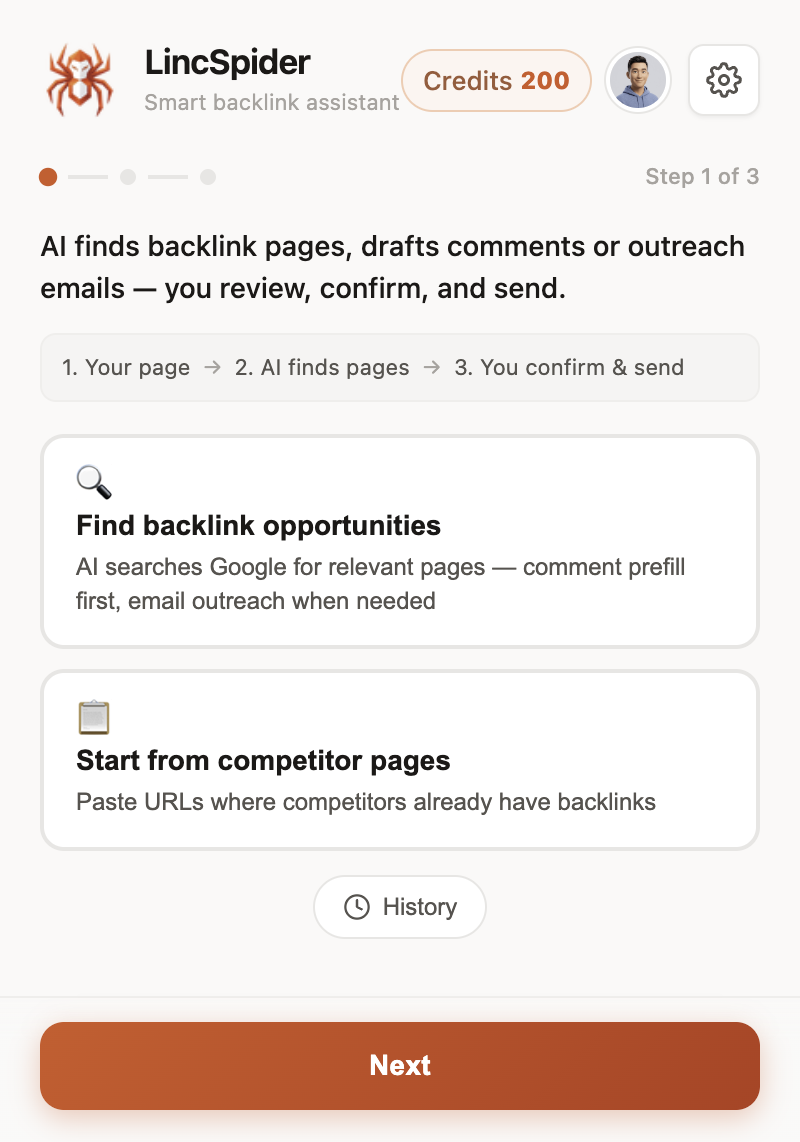
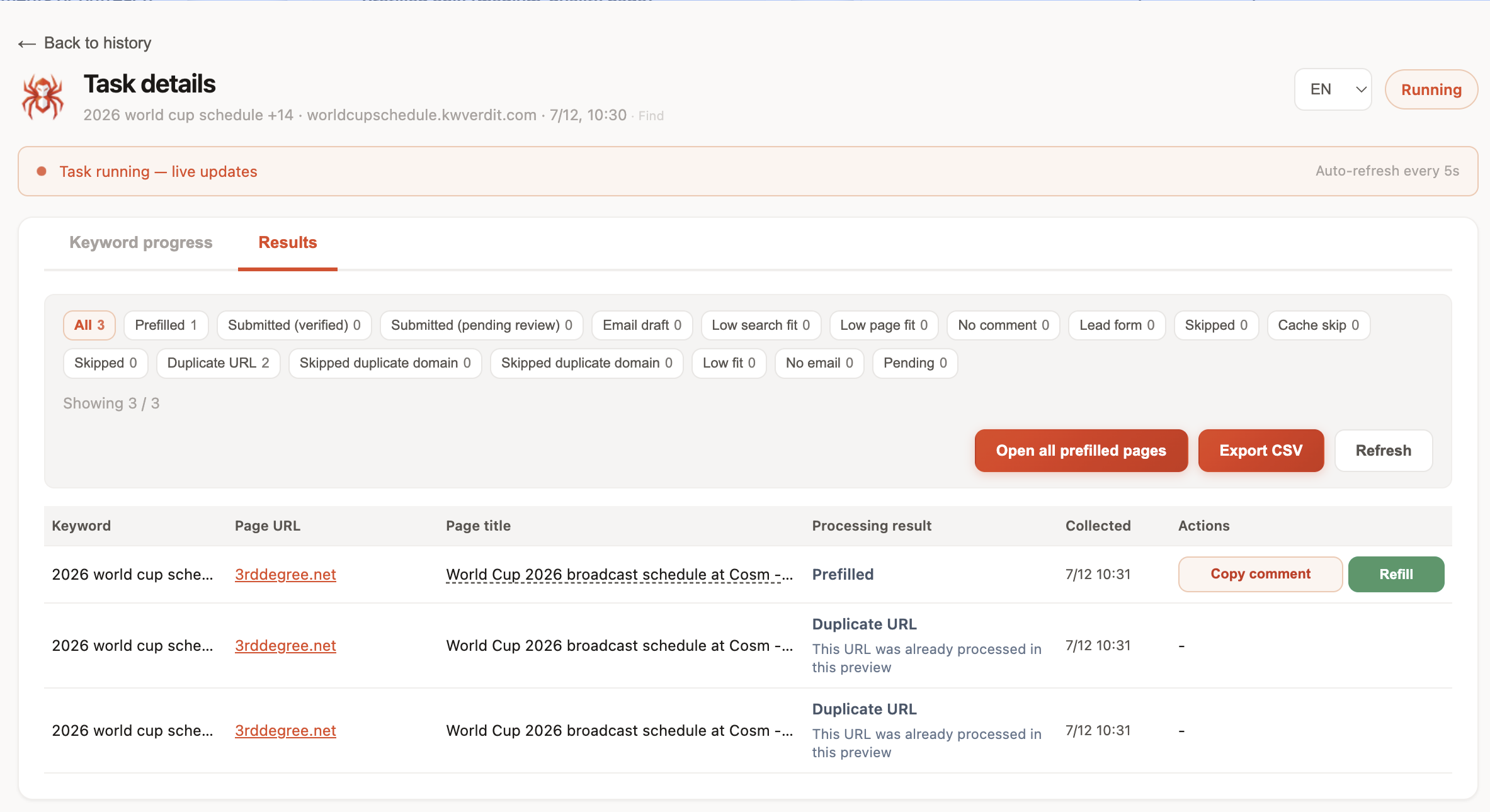
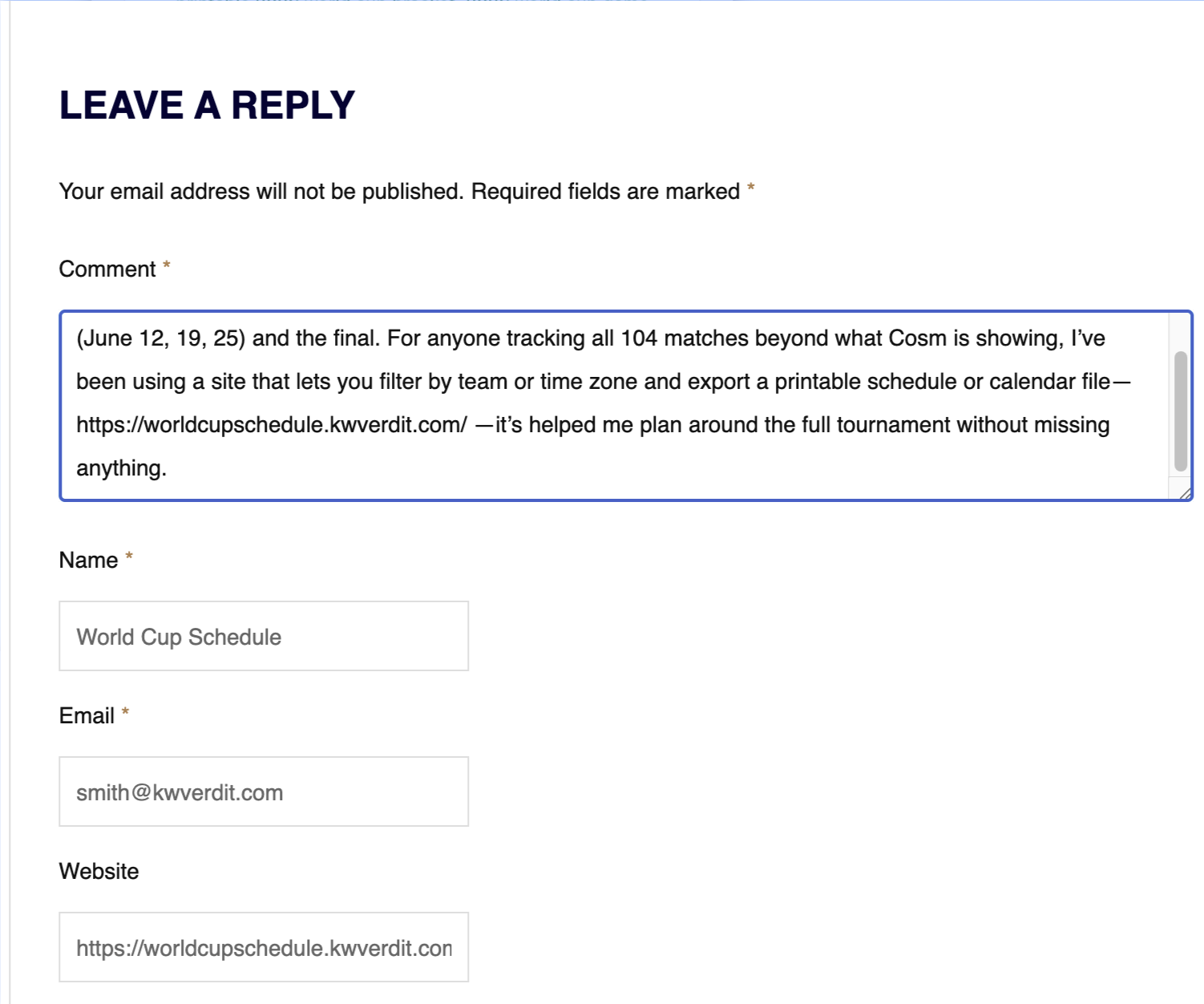
Threads on r/bigseo keep asking for extensions that meet you in the browser. That’s where LincSpider sits: find comment-capable pages, draft contextual text, prefill forms, draft outreach email when there’s no box — you click submit. Never auto-posts.
HN conversations about importing competitor backlinks into browser tools circle the same idea: research and execution live in different windows. Export from the audit → filter in Sheets → execute in Chrome.
Personalization still wins. On r/SEO:
Personalize outreach messages to avoid marked as spam.
A perfect toxic-score chart won’t fix a template pitch.
Full rhythm: Link Building in Chrome: A Practical Extension Workflow. Plans: /en/pricing.
What “good” looks like after one audit cycle
You don’t need 400 actions. You need a shortlist you can defend:
- Ten audited rows tagged
outreach - Seven survive a five-minute page vet
- Four get a contextual comment; three go to email
- You log approvals, deletions, and replies
That’s an audit that paid rent. A 40-page PDF that never leaves Drive didn’t.
Google’s ugc guidance sets expectations for user-generated links. Moz still frames thoughtful comments as marketing, not a ranking hack. Keep those frames when you convert audit rows into public text.
Cadence: How Often to Re-Audit
For a small site:
- Light pass: monthly GSC skim + sheet cleanup (30–60 minutes)
- Deeper suite audit: quarterly, or after a traffic shock / bad PR / known spam incident
- Outreach execution: weekly blocks that don’t depend on a fresh full audit
New-site advice on r/SEO still leans on slow, solid relationship work over spammy shortcuts. Audits should protect that path, not tempt you into buying junk because a checker looked empty.
Digital Point veterans warn against auto-approval spam pits — the same junk that shows up as “easy wins” in shallow free reports. Vet hard.
On tracking: r/bigseo debates fancy systems; for under ten touches a week, Sheets plus status columns usually wins.
FAQ
Can I run a useful free backlink audit?
Yes, for prioritization. Combine GSC, optional Bing WMT, and selective free checkers. You’ll miss crawl depth; you won’t miss the habit of classifying links before acting.
Does a free backlink audit replace Ahrefs?
No. Free layers sample and seed. Ahrefs-style audits add history, filters, and scale. Use free to start; pay when blindness costs more than the subscription.
How do I turn audit findings into outreach?
Tag rows outreach only when you’d actually want to appear there. Vet the page. Then comment contextually or email — don’t spray the whole export.
Should I disavow after every audit?
Usually no. Disavow is a careful last resort for problems you understand, not a monthly cleanup ritual driven by a free “toxic” score.
Where does LincSpider fit after an audit?
After classification. LincSpider helps you discover comment pages, draft, prefill, and prepare email — with human confirmation every submit. It is not a backlink audit tool.
How often should I re-audit a small site?
Light monthly, deeper when needed. Weekly time should go to vetted outreach, not endless report regeneration.
What if my audit shows almost no links?
Normal for new sites. Shift to opportunity finding (find blog comment opportunities) and quality content. Empty profiles don’t justify spammy volume.
Wrapping up
A backlink audit earns its keep when it changes next week’s calendar — not when it produces a prettier chart. Run a light free pass with GSC and honest free checkers. Borrow depth from suites like Ahrefs when the job demands it. Convert keep/monitor/outreach/skip into a short human queue, then execute in Chrome without auto-posting. Install from /en/download, compare /en/pricing, and keep the research/execution split clear: audits analyze; people (with better tabs) outreach.