
Affordable Link Building Tools for Small Teams
By LincSpider Team · 2026-07-20 · 12 min

Search link building tool and you’ll get the same carousel: enterprise suites, outreach CRMs, and “AI that builds links while you sleep.” Some of those products are excellent at research. Almost none of them match what a two-person team actually needs on Tuesday afternoon — a short list of pages, a draft worth posting, and a form that doesn’t eat twenty minutes of copy-paste.
This article compares affordable approaches by job: free discovery, spreadsheet tracking, Chrome execution, and paid suites when depth pays for itself. We’re biased toward LincSpider as a Chrome layer — and we’ll still say when Ahrefs or Semrush earn their keep. No tool-bashing. No fantasy that software posts for you.
For the full Chrome loop, read Link Building in Chrome: A Practical Extension Workflow. Pricing lives at /en/pricing.
What “Link Building Tool” Means on a Small Budget
Split the problem into four jobs:
| Job | What you’re buying | Cheap examples | Expensive examples |
|---|---|---|---|
| Discover | Find candidate pages/domains | Google operators, Bing WMT | Ahrefs/Semrush prospecting |
| Qualify | Decide what’s worth time | Your eyes + Sheet columns | DR/traffic filters in suites |
| Execute | Comment, email, follow up | Chrome + docs + mail | Outreach platforms |
| Track | Remember what you did | Google Sheets | Suite projects / CRM |
On r/SEO:
No tool can build link for you. Even if it does, it would be a spam with no SEO value.
That’s the budget filter that matters most. If a product promises unsupervised link building, price is irrelevant — risk is.
r/DigitalMarketing puts it cleaner:
The process matters more than the tool.
Buy tools that shorten a process you already understand.
Free Layer: Operators, Sheets, Webmaster Data
Google (and Bing) search operators
Forum footprints still work as a starting filter — then you vet. Digital Point threads catalog patterns like "post a comment" and -comments closed (example thread). Pair with niche keywords. Expect spam; that’s why qualify is a separate job.
Spreadsheets
Ugly, free, honest. Columns we use: URL, source (operator / competitor / alert), niche fit (1–5), form open?, draft status, date sent, result. r/bigseo debates fancy trackers; for under ten comments a week, Sheets wins.
Bing Webmaster Tools as free research
Same community tip we cite in the competitor article:
Go to Bing Webmaster Tools… Add a competitor domain. You'll see referring domains
(thread)
Not a full Ahrefs replacement. Enough to seed a month of outreach if you filter hard.
Google Alerts
Old, still useful for “new posts in niche.” Be first to a real conversation instead of scraping 2016 archives.
Cost of this layer: time. If you have more cash than hours later, graduate pieces — don’t buy everything on day one.
Ahrefs’ free Backlink Checker and Keyword Difficulty fit here too: Top-N samples for competitor channel types, KD for “is this term worth a link budget?” Free shows the front of the list; paid unlocks full active exports when copying three rivals stops being a hobby and becomes weekly work.
A one-week free-layer experiment
Spend the week proving process, not buying dashboards: operators → Sheet → Bing sample → five vetted comments. Rank tiers as free → exchange → paid for directories the same way: exhaust free and fair exchange before checkout, and sort paid options by relevance and traffic, not price alone.
- Day 1: Pick one niche phrase. Save five operator queries. Fill 25 URLs into a Sheet.
- Day 2: Vet hard. Keep eight. Drop the rest without guilt.
- Day 3–4: Write four contextual comments. Submit two; leave two for tomorrow if quality dips.
- Day 5: Log what got approved or deleted. Adjust footprints.
- Day 6–7: Optional — pull one competitor’s referring pages from Bing WMT and merge into the Sheet.
If that week felt productive, then look at paid layers. If it felt miserable because finding URLs was impossible, a research suite may be the right spend. If it felt miserable because writing was hard, no crawl database will save you — practice comments or hire help.
Indie Hackers warm-up advice still applies on a $0 stack: engage before you pitch.
Mid Layer: Chrome Workflows That Stay Human
Link building dies in tab chaos. You’re already on the page; jumping to a SaaS for every field is where campaigns stall. Threads on r/chrome_extensions and r/bigseo keep asking for extensions that meet you in the browser.
That’s the niche we care about: discover → review → draft → prefill, with you clicking submit.
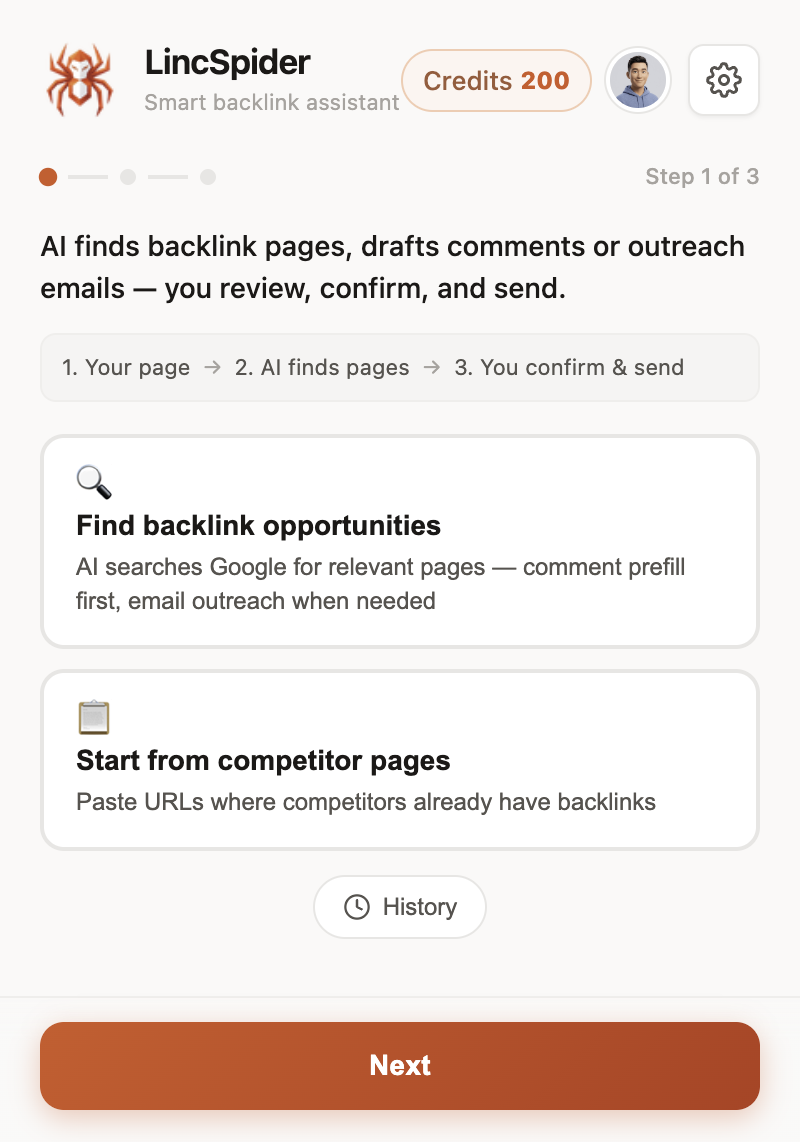
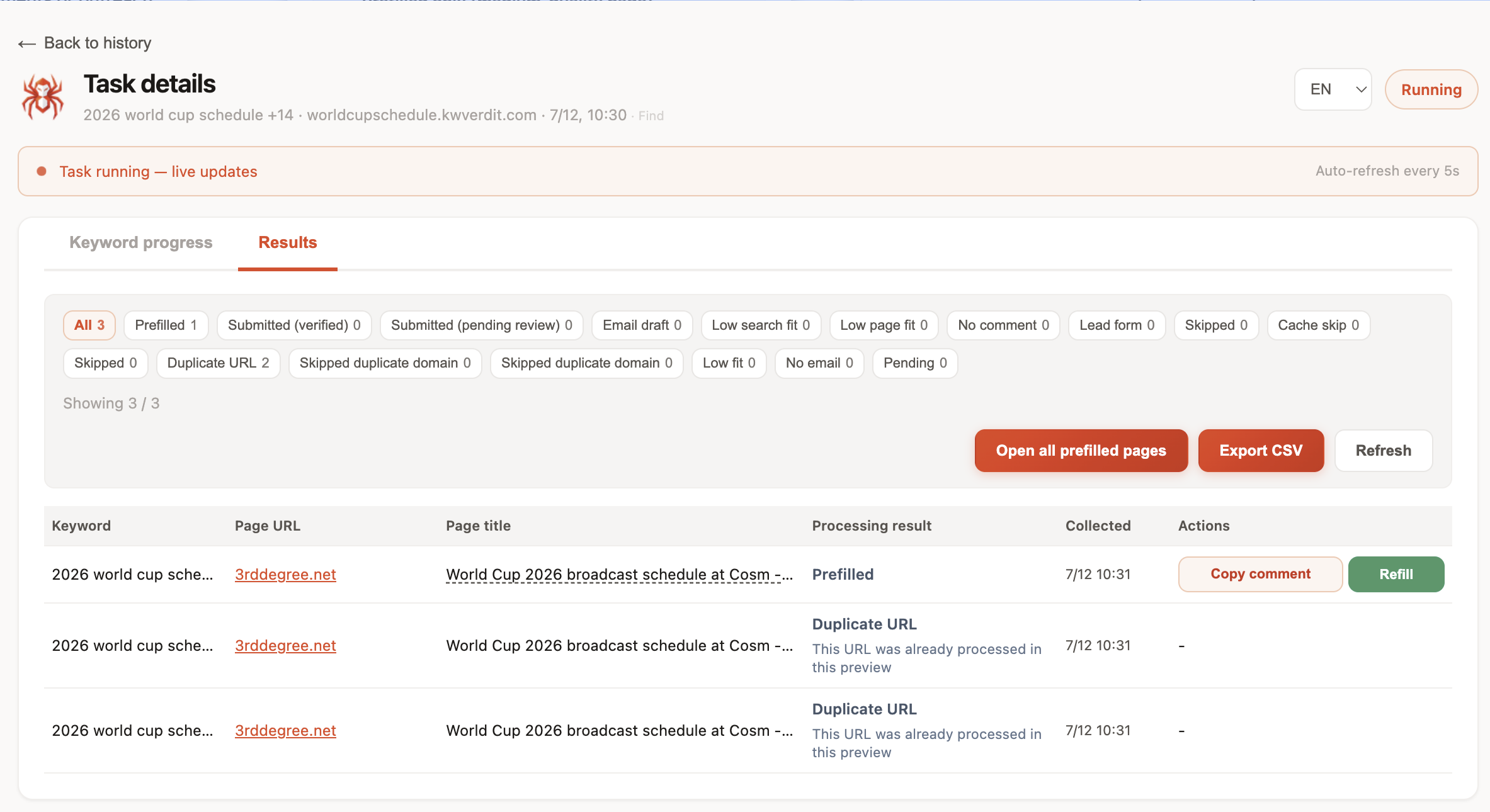
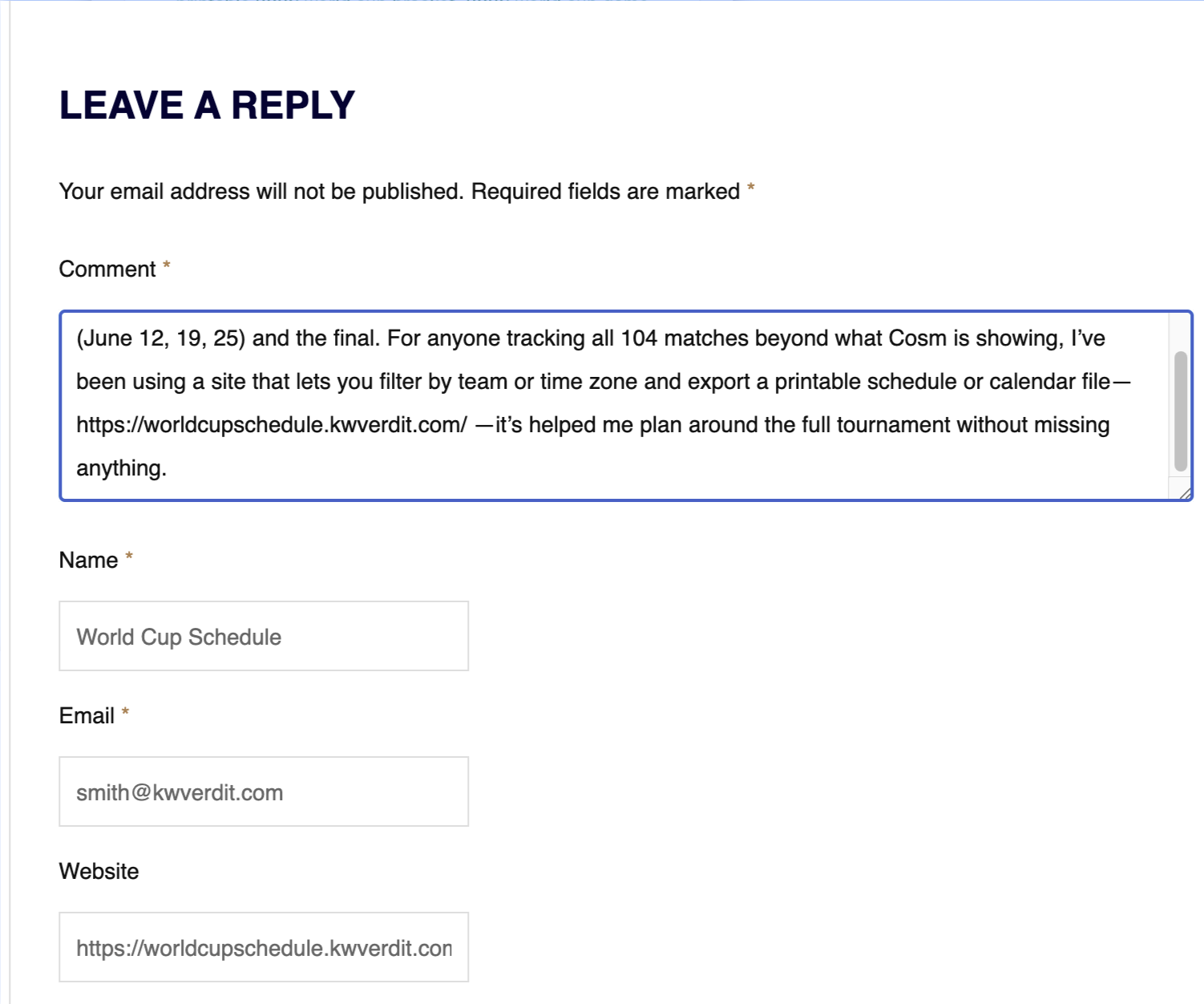
Indie Hackers repeats a useful split: automation for timing, human for message. Chrome tools should obey that. HN conversations about autofill helpers keep circling control — if you can’t review, don’t use it.
Manual outreach is still slow (r/SEO). Mid-layer tools should cut friction, not invent volume.
Full SOP: link building Chrome extension workflow.
What “affordable” should feel like in practice
A Tuesday block for one founder might look like:
- Open Sheet → pull five pre-vetted URLs.
- Open each tab once; skim for fit.
- Draft in the page context (extension or notes).
- Prefill, edit, submit two comments; park one for email.
Ninety minutes. No dashboard marathon. If your “link building tool” requires a weekly training webinar to ship two comments, it isn’t affordable — it’s a second job.
Starter operators that still earn a slot (swap your niche):
"your niche" "leave a reply"
"your niche" "post a comment" -"comments closed"
"your niche" inurl:blog "powered by WordPress"
Then vet. Operators are a sieve, not a strategy — same warning you see in classic footprint write-ups and Digital Point threads.
Paid Suites: When Research Depth Is Worth It
Ahrefs, Semrush, and peers are not scams. They’re research and monitoring platforms. Ahrefs’ competitor backlink guide shows depth free tools won’t match: historical graphs, huge crawls, intersect reports, content explorers.
When a suite is worth it for a small team:
- You manage multiple sites or clients and need shared data
- You run content + links and already use the suite for keywords
- Competitor gap analysis is weekly, not occasional
- You’re tired of incomplete free exports and the time cost exceeds the subscription
When it’s optional:
- You’re a solo founder doing 3–8 quality touches a week
- Your bottleneck is writing and personalization, not finding URLs
- You already have more prospects than you can vet
On r/seogrowth, gap analysis with Semrush or Ahrefs is a common first recommendation — for finding, not for posting. Keep that distinction.
Think in hours saved, not brand prestige. If the suite saves four hours of messy exports every month and those hours go into better comments, the subscription can be cheaper than “free.” If you open it twice a quarter to stare at Domain Rating, cancel and keep the Sheet.
Chrome SEO lists (Skrapp’s roundup) often mix toolbars and email finders. Useful pieces. Still not a substitute for a human-approved comment.
Broken-link checkers and “check my links” style extensions (mentioned on r/SEO) help one tactic. They don’t replace a weekly process.
If you already live inside a suite for content briefs, keep it. Layer Chrome on top instead of ripping out a workflow that already works. The expensive mistake is paying for two research products while still copy-pasting comment forms by hand.
Sample Budgets (Not Prescriptions)
| Monthly cash | Suggested stack | What you skip |
|---|---|---|
| $0 | Operators + Alerts + Bing WMT + Sheets + Gmail | Suites, outreach CRMs |
| Mid (extension credits / small SaaS) | Free layer + Chrome workflow (LincSpider) | Second suite, AI auto-post bots |
| Higher | Free layer + Chrome + one research suite you already use for SEO | Duplicate crawl products |
Numbers move. The structure doesn’t: don’t buy three tools that all “find opportunities” while nothing helps you write a comment a moderator would approve.
How to Combine Layers Without Paying Twice
| If you already pay for… | Add | Skip for now |
|---|---|---|
| Ahrefs/Semrush | Chrome execution + Sheet tracker | Second full suite |
| Nothing | Operators + Bing WMT + Sheet + Chrome workflow | Outreach CRM |
| Pitchbox-style outreach | Better discovery filters | Another autofill bot |
Export from the suite → filter in Sheets → execute in Chrome. HN users describe importing competitor backlinks into browser tools for the same reason: research and execution live in different windows.
Moz still frames comments as marketing. SEJ reminds you not to buy tools hoping comment links alone will move rankings. Google’s ugc guidance sets the technical expectation.
Warrior Forum called commenting a reputation tool years ago. Tools should serve reputation, not spray it.
WebmasterWorld members chasing referral traffic didn’t need a six-tool stack to leave a useful comment. They needed judgment. Software should make judgment faster to apply — not louder.
Evaluation Checklist Before You Subscribe
Ask every vendor (including us):
- Does it help discover, qualify, execute, or track — which jobs?
- Can I review every public action?
- What happens if I cancel — do I keep my lists?
- Is pricing predictable at my weekly volume?
- Does it duplicate a suite I already own?
- Will it push me toward spammy volume metrics?
WebmasterWorld preferred friendly email over spam comments. Any tool that makes spam easier fails this checklist.
Where LincSpider Fits on Pricing
LincSpider is the affordable Chrome execution layer: find pages, review, draft contextual comments, prefill forms — human in the loop. It is not trying to replace Ahrefs’ index.
- Try the product: /en/download
- Compare plans: /en/pricing
- Run the SOP: Chrome extension workflow
HN’s old skepticism about SEO snake oil still applies: if the pitch is “set and forget links,” walk away. If the pitch is “faster tabs, you still write,” stay curious.
FAQ
What is the best link building tool for a small team?
There isn’t one. Best stack is usually free discovery + a tracker + a Chrome workflow you control. Add a suite when research time costs more than the subscription.
Can I build links with only free tools?
You can run a comment-and-relationship program with operators, Alerts, Bing data, and Sheets. Scale and crawl depth will lag paid indexes.
Do I need Ahrefs if I use LincSpider?
No. They solve different jobs. Many teams use a suite for research and LincSpider (or similar) for on-page execution. Either alone can work at small volume.
Are Chrome extensions enough for link building?
Enough for execution if your discovery sources are solid. Not enough if you need enterprise-scale backlink databases.
How much should a solo founder budget?
Start at $0 tools + calendar time. Add a mid-layer extension when copy-paste is the bottleneck. Add a suite when you feel blind on competitors every week.
What should a link building tool never automate?
Public posting and personalized pitches without review. r/SEO still hammers personalization for a reason.
How do I compare pricing honestly?
Price per reviewed action, not per “opportunity found.” Cheap tools that dump 5,000 junk URLs cost more in hours.
Wrapping up
Affordable link building isn’t “never pay.” It’s pay for the job you’re missing. Free operators and Sheets get you moving. Chrome workflows protect your time without removing judgment. Suites buy research depth when you need it — and they deserve credit when they do. See /en/pricing, install from /en/download, and steal the operating rhythm from the Chrome workflow article.