
How to Find Blog Comment Backlink Opportunities (2026)
By LincSpider Team · 2026-07-13 · 11 min

If you read our guide to blog comment link building, you already know the honest part: most comment links are nofollow, and comments are marketing — not a ranking hack. This article answers the next question we get on r/SEO: how do you actually find pages worth commenting on without burning an afternoon on dead threads and spam pits?
We're indie operators building LincSpider — a Chrome extension for discovering pages, drafting comments, and prefilling forms. You approve every step. Even if you never install it, the find-and-vet workflow below stands on its own.
What You're Actually Looking For
A comment-ready page is not just "a blog." It's a recent post in your niche where:
- The comment form is open (not "comments closed" or login-only walls)
- Real people are discussing — not 400 auto-approved spam entries
- You can add something relevant without looking like SEO graffiti
Warrior Forum regulars still say the same thing: stay niche-related, use your real name, and treat comments as dialogue — not a dofollow treasure hunt.
We are not building a list of "100 High DA dofollow comment blogs." That SERP angle leads to spam footprints. We're building a short queue of pages where a good comment might get approved and might send a click or start a relationship. For the why behind that, see the parent guide.
Google Search Operators That Still Work
Yes, some Reddit threads complain that Google ignores operators more than it used to. Forum veterans and Shane Rutter's classic footprint list still use them as a starting filter — then you vet by hand.
On r/SEO:
Intitle: helps find pages with terms in the title. Inurl: finds pages in the URL.
Starter queries (swap your keyword for your niche)
"your keyword" + "leave a reply"
"your keyword" + "post a comment"
inurl:blog "your keyword" "comments"
Advanced footprint (from Digital Point)
site:.com inurl:blog "post a comment" -"comments closed" -"you must be logged in" "your keyword"
The negatives matter. Digital Point members warn that open comment sections full of keyword-stuffed spam are a waste of time — skip them early.
| Query pattern | What it surfaces |
|---|---|
"keyword" "leave a reply" | WordPress-style posts with reply boxes |
inurl:blog "keyword" "post a comment" | Blog subdirectory pages |
-comments closed | Drops obviously dead threads |
-you must be logged in | Avoids gated communities you can't join fast |
Run 3–5 variants, open the top 20 results, and vet — don't bookmark blindly.
Five-Minute Vetting Checklist
Before you draft a comment, spend five minutes on the page. We use this checklist on every opportunity in LincSpider:
- Relevance — Is the post actually in your vertical? Random promos on unrelated blogs hurt more than they help (Moz on comment marketing).
- Comments open — No "comments are closed" banner; form loads without a hard login wall.
- Moderation signal — Some real discussion; not 100% "Great post!" clones.
- Recency — Published in the last few months? Old threads are graveyards.
- Author engagement — Does the blogger reply? Gatilab's 2026 guide notes that author responses predict whether your comment matters.
- Your angle — Can you reference one specific point and add a tiny example? If not, skip.
Avoid commenting in 1 or 2 sentences with a link… Make sure your comments provide added [value].
Finding pages is step one. Qualifying them is what keeps you out of spam territory — and sets up contextual comments later.
Find Pages Faster with Google Alerts and RSS
Manual Google searches don't scale. Digital Point's old thread still recommends Google Alerts for new posts in your niche — show up early while the discussion is live.
Setup we use:
- Alert query: your core niche phrase +
blogor a competitor brand you respect - Frequency: once a day (enough for comment marketing volume)
- When an alert fires → run the vetting checklist → add to your queue
RSS/Feedly for 10–20 blogs you already admire works too. Indie Hackers founders talk about building a list of 50–100 people in your niche and leaving meaningful comments before cold outreach — Alerts and RSS are how you find their new posts without living in Google.
Reverse-Engineer from Competitor Link Pages
Another path: see where peers already show up.
On r/seogrowth:
As a first step I would run a competitor backlink gap analysis using semrush or ahrefs.
Paid tools work. So does Bing Webmaster Tools — add a competitor domain, inspect referring pages, filter for /blog/ paths and comment-heavy URLs.
Process:
- Pick one competitor ranking for your target topic
- Export or browse referring URLs
- Keep pages that look like blog posts with comment sections
- Vet each with the checklist above
Extra leverage many people skip: the domains other commenters already used in those threads. Add them to a “peer sites” column and reverse-check their referring pages too. After export, delete rows you cannot actively publish on (pure natural citations, paid placements, closed forms) before they clutter the weekly queue.
Cold start when your spreadsheet is empty
Brand-new site, empty queue? For day one, skip the long-tail operator hunt:
- Pick 3–5 competitors already getting search traffic in your vertical
- Export active backlinks (Semrush, Ahrefs — whichever exports cleanly for you)
- Filter to blog/forum comment URLs; delete paid links, citations you can't pitch, and dead pages
- Mine comment threads for other commenters' domains — those become the next reverse-lookup batch
One hour of this usually beats an afternoon of "keyword" "leave a reply" guessing. You're copying fields competitors already validated, not inventing footprints from scratch.
r/DigitalMarketing puts it well: the process matters more than the tool. A spreadsheet beats a $129 subscription you never open.
Before you comment: read 5–10 existing posts
Finding the page isn't enough. On each target post, scroll 5–10 approved comments and note the link pattern:
| What you see | What to do |
|---|---|
| Links in comment bodies | You can embed yours when it fits the thread |
| Plain text, clickable author names | Use the Website / URL field only — no body link |
| Buried or hidden form | Scroll manually; don't trust auto-fill alone |
Two minutes here saves rejected drafts. Same rule as the parent guide: approval is the metric.
Comment links: niche ceiling check
Comment discovery pays off most in low-competition niches — page-one sites under DR 30 with a few hundred referring links total. In high-monetization verticals (AI video, etc.), peers buy high-DR links; a comment-only queue won't keep pace.
If your traffic stalls after an early climb, export competitors' new backlinks from the last three months before you rewrite on-page SEO. Often the gap is link mix, not content quality.
Organize Opportunities (Spreadsheet → Chrome)
We tracked opportunities in a sheet before we built product features for it. Minimum columns:
| Column | Example |
|---|---|
| URL | https://example.com/blog/post-slug |
| Domain | example.com |
| Status | queued / commented / skipped |
| Niche fit | high / medium / low |
| Notes | "Author replies; 12 real comments" |
r/bigseo users import prospects into SEMrush — same idea: don't lose URLs in browser tabs.
When the sheet gets painful around 20+ rows a week, we switch to Chrome discovery:
LincSpider discovery flow
1. Seed from your promotion URL or a competitor link page
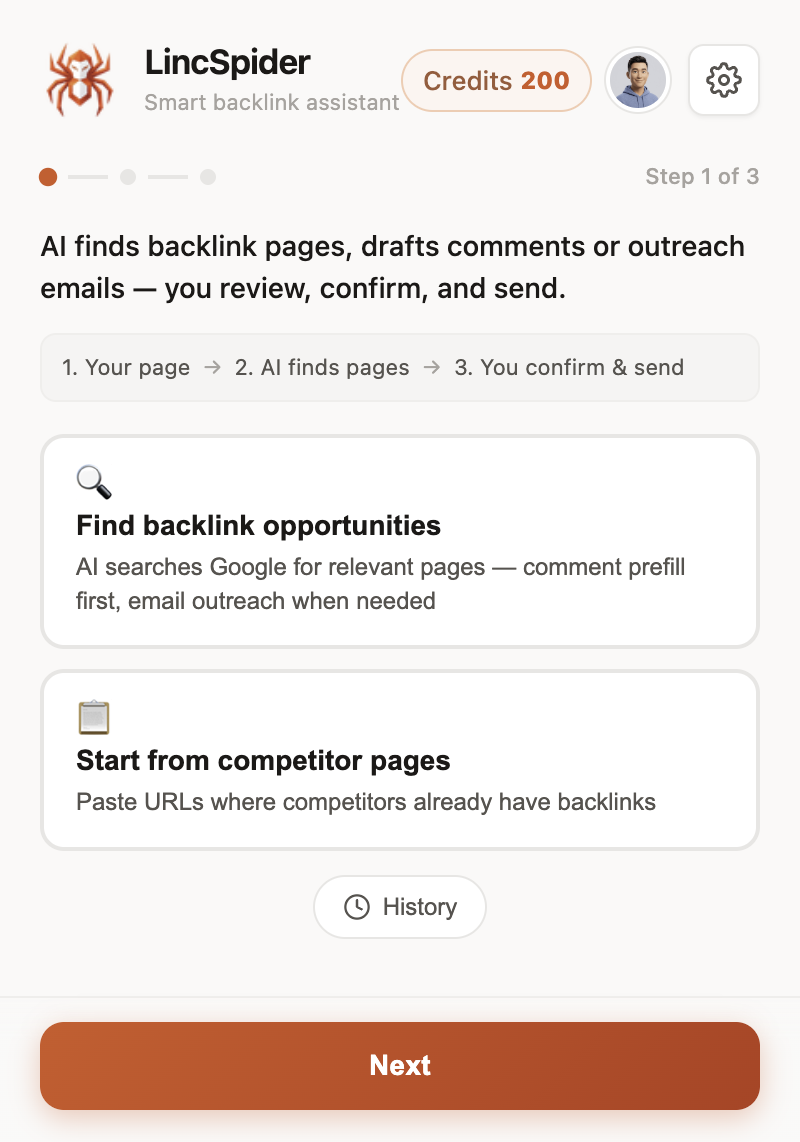
2. Review suggestions before you invest time
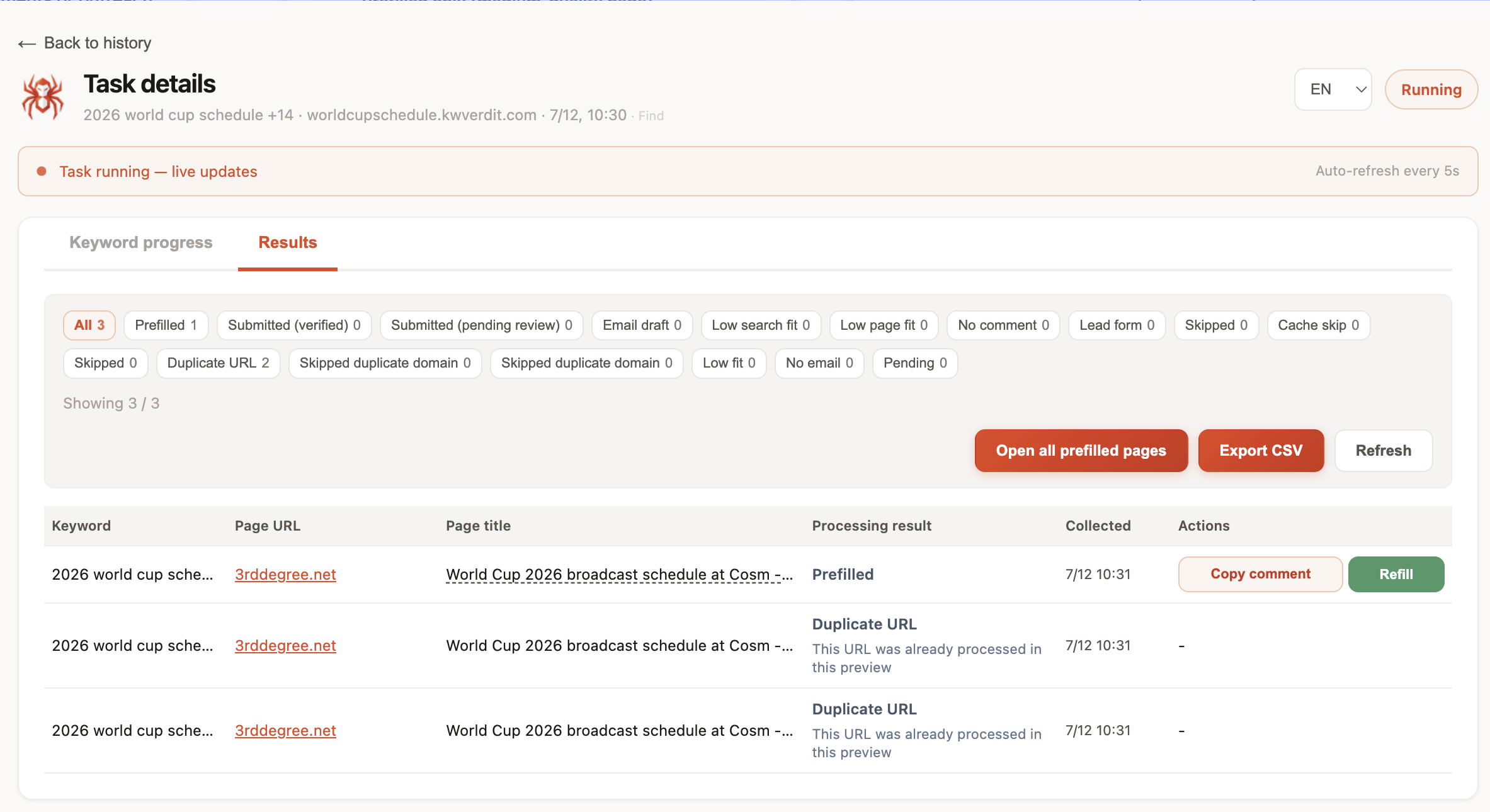
3. Auto-discover generates contextual starting points
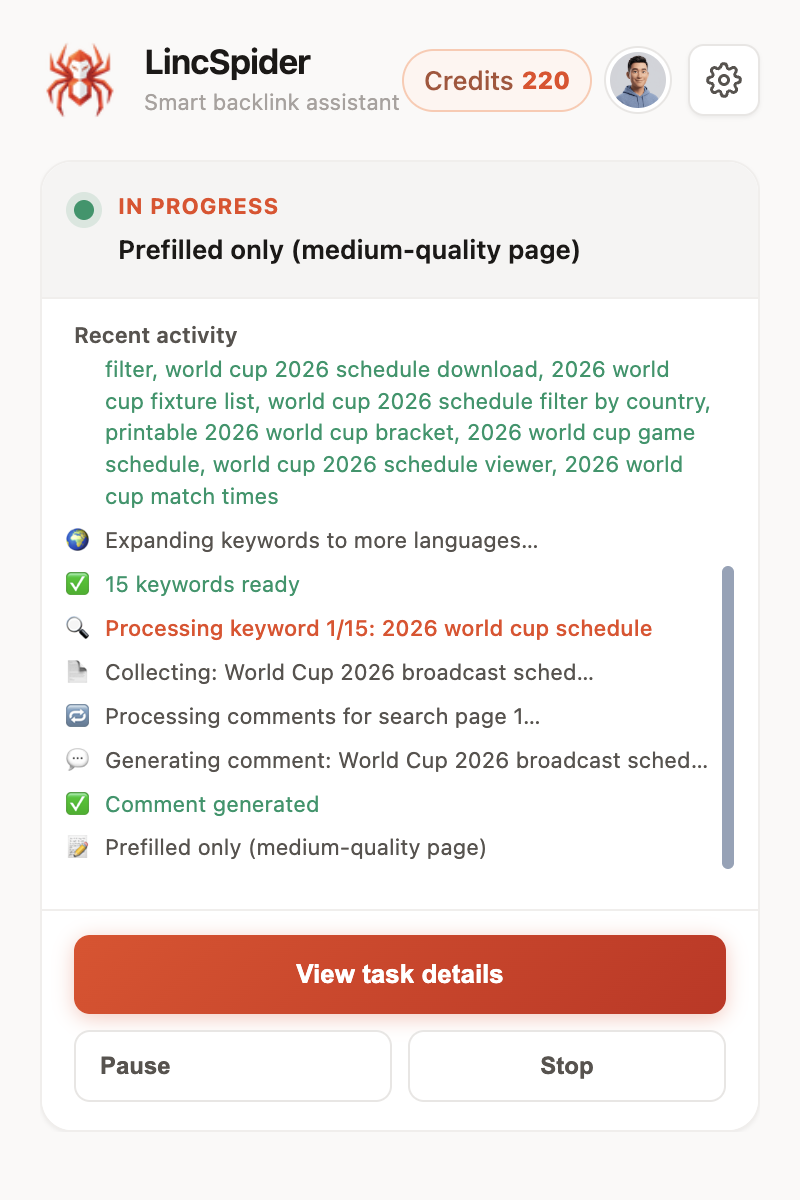
Same human-in-the-loop rule as the flagship workflow: LincSpider does not auto-post. Preview up to 3 drafts without signing in; see pricing if you need more volume.
For the full Chrome rhythm — discover, draft, prefill — read Link Building in Chrome: A Practical Extension Workflow.
When a Page Fails the Checklist
Not every URL deserves a comment.
- No comment box → outreach email path (see parent guide § outreach)
- Spam graveyard → skip; WebmasterWorld members have warned for years against "seeding blogs" just for links
- Wrong niche → skip, full stop
Comment marketing is a small slice of off-page time — not the whole strategy.
FAQ
What Google operators find comment-ready blogs?
Start with "keyword" "leave a reply", inurl:blog "keyword" "post a comment", and negatives like -comments closed. Vet every result manually.
How do I vet a blog before commenting?
Check relevance, open comments, real discussion, recency, and whether you can add a specific insight — not a one-liner plus link.
Can I find opportunities from competitor backlinks?
Yes. Use Ahrefs, Semrush, or Bing WMT referring pages; filter for blog URLs; run the vetting checklist.
How many pages should I queue per week?
For comment marketing, 10–20 qualified pages per week is plenty. You'll only comment on 3–10 of them.
Are dofollow comment blogs worth hunting?
Most experienced forum users say no — it leads to spam footprints (Warrior Forum).
What if Google operators return spam blogs?
That's common. Negatives help; vetting is mandatory. Don't auto-comment on everything you find.
How does LincSpider discovery differ from manual search?
It seeds from your URL or competitor pages, surfaces candidates in Chrome, and lets you review before drafting — you still approve every comment.
Wrapping up
Find blog comment backlink opportunities in 2026 is mostly discipline: good operators, a vetting checklist, and a queue you actually use. Google Alerts and competitor pages fill the top of the funnel; Chrome tooling saves copy-paste when the list grows.
Start with one niche query today. Vet five results. Queue the two that pass. Then write comments that sound like you — the parent guide covers that part.
Try LincSpider free if you want discovery and drafts in the same browser tab.
Sources: Reddit, Digital Point, Warrior Forum, WebmasterWorld, Moz, Shane Rutter, Indie Hackers, Gatilab.